Bundle
Asset Bundle 為資源模組化工具,可讓開發者依照專案需求將貼圖、腳本、場景等資源劃分在多個 Asset Bundle 中,然後在遊戲執行過程中,依照需求去載入不同的 Asset Bundle ,以減少啟動時需要加載的資源數量,從而減少首次下載和加載遊戲時所需的時間。
Info
Asset Bundle 可以與遊戲本體放置在同一位置,也可以放置於其他遠端伺服器。
官方有特別提到 Web平台 不支援載入遠端的 Asset Bundle,實際上是可以的,但需要調整一些專案建置的設定。
內建的 Asset Bundle
專案中除了自訂的 Asset Bundle 外,也有內建的 3 個 Asset Bundle。 內建 Asset Bundle 也可以根據不同平台進行設定。

| 內建 Asset Bundle | 功能說明 | 配置方法 |
|---|---|---|
| main | 存放所有在 構建發布 面板的 參與構建場景 中勾選的場景以及其依賴資源 | 透過配置 構建發布 面板的 主包壓縮類型 和 配置主包為遠端包 兩項 |
| resources | 存放 resources 目錄下的所有資源以及其依賴資源 | 透過配置 資源管理器 中的 assets\resources 資料夾 |
| start-scene | 如果在 構建發布 面板中勾選了 初始場景分包,則初始場景將會構建到 start-scene 中。 | 無法進行配置 |
在構建完成後,內建 Asset Bundle 會根據配置決定它所產生的位置,具體的配置方法以及產生規則請參考 配置 Asset Bundle。
內建 Asset Bundle 是在 application.js 中進行載入的,你可以透過自訂構建範本功能修改 application.js 中的載入程式碼,如下所示:
function loadAssetBundle (hasResourcesBundle, hasStartSceneBundle) {
    const mainBundleRoot = 'http://myserver.com/assets/main';
    const resourcesBundleRoot = 'http://myserver.com/assets/resources';
    const bundleRoot = hasResourcesBundle ? [resourcesBundleRoot, mainBundleRoot] : [mainBundleRoot];
    return bundleRoot.reduce((pre, name) => pre.then(() => loadBundle(name)), Promise.resolve());
}

function loadBundle (name) {
    return new Promise((resolve, reject) => {
        assetManager.loadBundle(name, (err, bundle) => {
            if (err) {
                return reject(err);
            }
            resolve(bundle);
        });
    });
}
配置方法
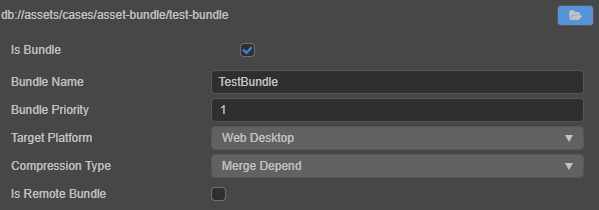
自訂 Asset Bundle 是以 資料夾 為單位進行配置的。 當我們在 資源管理器 中選取一個資料夾時, 屬性檢查器 中就會出現一個 Is Bundle 的選項,勾選後會出現如下圖的設定項:
| 配置選項 | 功能說明 |
|---|---|
| Bundle Name | Asset Bundle 構建後的名稱,預設會使用這個資料夾的名字,可依需求修改。 |
| Bundle Priority | 有 20 個可供配置的優先級,構建時將會依照優先級 從大到小 的順序將 Asset Bundle 依序構建。 具體內容請參考 Asset Bundle 優先級。 |
| Target Platform | 不同平台可使用不同的配置,構建時將根據對應平台的設定來構建 Asset Bundle。 |
| Compression Type | 決定 Asset Bundle 最後的輸出形式。 具體內容請參考 Asset Bundle 壓縮類型。 |
| Is Remote Bundle | 是否將 Asset Bundle 配置為遠端包,不支援 Web 平台。 若勾選了該項,則 Asset Bundle 在構建後會被放到 remote 資料夾,你需要將整個 remote 資料夾放到遠端伺服器上。 構建 OPPO、vivo、華為等小遊戲平台時,若勾選了該項,則不會將 Asset Bundle 打包到 rpk 中。 |
配置完成後點選右上方的 綠色打鉤按鈕 ,這個資料夾就被配置為 Asset Bundle 了,然後在 構建發布 選擇對應的平台進行構建。
設定 Bundle Name 時請不要使用 內建 Asset Bundle 的 resources、main、start-scene 這三個名稱。
優先級
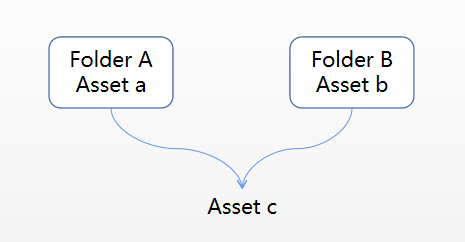
當資料夾設定為 Asset Bundle 之後,會將資料夾中的資源以及資料夾外的相關依賴資源都合併到同一個 Asset Bundle 中。 這樣就有可能出現某個資源雖然不在 Asset Bundle 資料夾中,但因為同時被兩個 Asset Bundle 所依賴,所以屬於兩個 Asset Bundle 的情況,如圖所示:
或是某個資源在一個 Asset Bundle 資料夾中,但同時又被其他 Asset Bundle 所依賴,如圖所示:
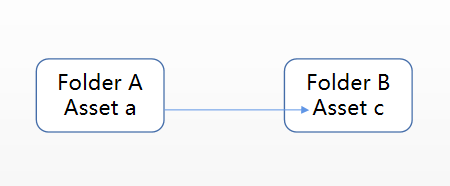
在這兩種情況下,Asset c 既屬於 Asset Bundle A,也屬於 Asset Bundle B。此時需要透過調整 Asset Bundle 的優先級來指定 Asset c 要存在於哪一個 Asset Bundle 中。
Cocos Creator 有 20 個可供配置的優先級,構建時將會依照優先級 從大到小 的順序將 Asset Bundle 依序構建。
- 當同一個資源被 不同優先級 的多個 Asset Bundle 引用時,資源會優先放在優先級高的 Asset Bundle 中,此時低優先級的 Asset Bundle 會依賴高優先權的 Asset Bundle。
如果想在低優先級的 Asset Bundle 中載入此共享資源,必須在載入低優先級的 Asset Bundle 之前 先載入高優先級的 Asset Bundle。
- 當同一個資源被 相同優先級 的多個 Asset Bundle 引用時,資源會在每個 Asset Bundle 中複製一份。 此時不同的 Asset Bundle 之間沒有依賴關係,可依任意順序載入。 所以請盡量確保共享的資源(例如 Texture、SpriteFrame、Audio 等)所在的 Asset Bundle 優先級更高,以便讓更多低優先級的 Asset Bundle 共享資源,從而最小化包體。
3 + 1 個內建 Asset Bundle 資料夾的優先級分別為:
| 內建 Asset Bundle | 優先級 |
|---|---|
| internal | 21 |
| start-scene | 20 |
| resources | 8 |
| main | 7 |
當內建 Asset Bundle 中有相同資源時,資源會優先儲存在優先級高的 Asset Bundle 中。 建議其他自訂的 Asset Bundle 優先級 不要高於 內建的 Asset Bundle,以便盡可能共用內建 Asset Bundle 中的資源。
壓縮類型
Cocos Creator 提供了 None、Merge Depend、Merge All JSON、Zip、Mini Game Subpackage 這幾種壓縮類型用於優化 Asset Bundle。 所有 Asset Bundle 預設使用 Merge Depend 壓縮類型,開發者可重新設定包含內建 Asset Bundle 在內的所有 Asset Bundle 的壓縮類型。
| 壓縮類型 | 功能說明 |
|---|---|
| None | 構建 Asset Bundle 時沒有任何壓縮操作 |
| Merge Depend | 構建 Asset Bundle 時會將相互依賴的資源的 JSON 檔案合併在一起,從而減少執行時的載入請求次數 |
| Merge All JSON | 構建 Asset Bundle 時會將所有資源的 JSON 檔案合併為一個,從而最大化減少請求數量,但可能會增加單一資源的載入時間 |
| Zip | 在提供了分包功能的小型遊戲平台,會將 Asset Bundle 設定為對應平台上的分包。 |
| Mini Game Subpackage | 在部分小遊戲平台,構建 Asset Bundle 時會將資源檔案壓縮成一個 Zip 文件,從而減少運行時的載入請求數量 |
如果開發者在不同平台對 Asset Bundle 設定了不同的壓縮類型,那麼構建時將根據對應平台的設定來構建 Asset Bundle。
Asset Bundle 的構建
在構建時,配置為 Asset Bundle 的資料夾中的資源(包含場景、程式碼和其他資源)以及資料夾外的相關依賴資源都會合併到同一個 Asset Bundle 資料夾。 例如場景 A 放在 a 資料夾中,當 a 資料夾配置為 Asset Bundle 後,場景 A 以及它所依賴的資源都會被合併到 Asset Bundle a 資料夾中。
配置為 Asset Bundle 的資料夾中的所有 程式碼 和 資源,會進行以下處理:
-
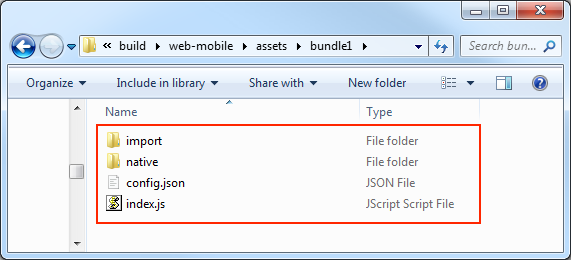
程式碼:資料夾中的所有程式碼會根據發布平台合併成一個 index.js 或 game.js 的入口腳本檔案。
-
資源:資料夾中的所有資源以及資料夾外的相關依賴資源都會放到 import 或 native 目錄下。
-
資源配置:所有資源的設定資訊包括路徑、類型、版本資訊都會合併成一個 config.json 檔案。
構建後產生的 Asset Bundle 目錄結構如下圖所示:
構建完成後,這個 Asset Bundle 資料夾會被打包到對應平台目錄下的 assets 資料夾中。 但有以下兩種特殊情況:
-
配置 Asset Bundle 時,若勾選了 Is Remote Bundle,則這個 Asset Bundle 資料夾會被打包到對應平台目錄下的 remote 資料夾中。
-
配置 Asset Bundle 時,若設定了 Compression Type 為 Mini Game Subpackage,則這個 Asset Bundle 資料夾會被打包到對應平台目錄下的 subpackages 資料夾中。
assets、remote、subpackages 這三個資料夾中包含的每個資料夾都是一個 Asset Bundle。
Asset Bundle 中的腳本
Asset Bundle 支援腳本分包。如果開發者的 Asset Bundle 中包含腳本文件,則所有腳本都會合併為一個 js 文件。在載入 Asset Bundle 時,就會去載入這個 js 檔案。
Warning
不同 Asset Bundle 中的腳本建議最好不要互相引用,否則可能會導致在執行時找不到對應腳本。如果需要引用某些 class 或 variable,可以將該 class 和 variable 暴露在一個你自己的 namespace 中,從而實現共享。
載入 Asset Bundle
Cocos Creator 提供了一個統一的 API assetManager.loadBundle 來載入 Asset Bundle,載入時需要傳入 Asset Bundle 的 Bundle Name 或 Asset Bundle 的 url。 但當你重複使用其他專案的 Asset Bundle 時,則只能透過 url 進行載入。 使用方法如下:
assetManager.loadBundle('01_graphics', (err, bundle) => {
    bundle.load('xxx');
});

// 當重複使用其他專案的 Asset Bundle 時
assetManager.loadBundle('https://othergame.com/remote/01_graphics', (err, bundle) => {
    bundle.load('xxx');
});
assetManager.loadBundle 也支援傳入使用者空間中的路徑來載入使用者空間中的 Asset Bundle。 透過對應平台提供的下載介面將 Asset Bundle 提前下載到用戶空間中,然後再使用 loadBundle 進行載入,開發者就可以完全自己管理 Asset Bundle 的下載與快取過程。 例如:
// 提前下載某個 Asset Bundle 到用戶空間 pathToBundle 目錄下。 需要確保用戶空間下的 Asset Bundle 和對應原始 Asset Bundle 的結構和內容完全一樣
// ...

// 透過 Asset Bundle 在使用者空間中的路徑進行載入
// 原生平台
assetManager.loadBundle(jsb.fileUtils.getWritablePath() + '/pathToBundle/bundleName', (err, bundle) => {
    // ...
});
Note
在配置 Asset Bundle 時,若勾選了 Is Remote Bundle,那麼構建時請在 構建發布 面板中填入 資源伺服器位址。
透過 API 載入 Asset Bundle 時,引擎並沒有載入 Asset Bundle 中的所有資源,而是載入 Asset Bundle 的 資源清單,以及包含的 所有腳本。
當 Asset Bundle 載入完成後,會執行 callback 並將錯誤訊息和 AssetManager.Bundle 類別的實例作為 callback 的參數開放出來,這個實例就是 Asset Bundle API 的主要入口,開發者可以使用它來載入 Asset Bundle 中的各類別資源。
Asset Bundle 的版本
Asset Bundle 在更新上延續了 Cocos Creator 的 MD5 方案。 當你需要更新遠端伺服器上的 Asset Bundle 時,請在 構建發布 面板中勾選 MD5 Cache 選項,此時構建出來的 Asset Bundle 中的 config.json 檔案名稱會附帶 Hash 值。 如圖所示:
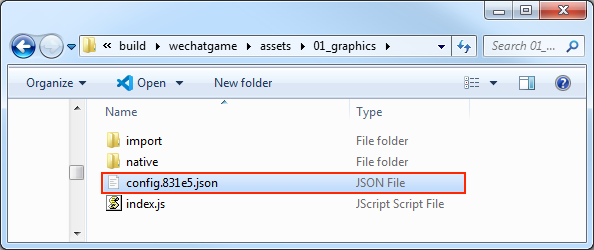
在載入 Asset Bundle 時 不需要 額外提供對應的 Hash 值,Cocos Creator 會在 settings.json 中查詢對應的 Hash 值,並自動做出調整。
但如果你想要將相關版本設定資訊儲存在伺服器上,啟動時動態取得版本資訊以實現熱更新,你也可以手動指定一個版本 Hash 值並傳入 loadBundle 中,此時將會以傳入的 Hash 值為準:
assetManager.loadBundle('01_graphics', {version: 'fbc07'}, (err, bundle) {
    if (err) {
        return console.error(err);
    }
    console.log('load bundle successfully.');
});
這樣就能繞過快取中的舊版文件,重新下載最新版本的 Asset Bundle。
載入 Asset Bundle 中的資源
在 Asset Bundle 載入完成後,傳回了一個 AssetManager.Bundle 類別的實例。 我們可以透過實例上的 load 方法來載入 Asset Bundle 中的資源,此方法的參數與 resources.load 相同,只需要傳入資源相對 Asset Bundle 的路徑即可。 但要注意的是,路徑的結尾處 不能 包含檔案副檔名。
// 載入 Prefab
bundle.load('prefab', Prefab, (err, prefab) {
    let newNode = instantiate(prefab);
    director.getScene().addChild(newNode);
});

// 載入 Texture
bundle.load('image/texture', Texture2D, (err, texture) {
    console.log(texture);
});
與 resources.load 相同,load 方法也提供了一個類型參數,這在載入同名資源或載入 SpriteFrame 時十分有效。
// 載入 SpriteFrame
bundle.load('image/spriteFrame', SpriteFrame, (err, spriteFrame) {
    console.log(spriteFrame);
});
批量載入資源
Asset Bundle 提供了 loadDir 方法來批量載入相同目錄下的多個資源。 此方法的參數與 resources.loadDir 相似,只需要傳入該目錄相對 Asset Bundle 的路徑即可。
// 載入 textures 目錄下的所有資源
bundle.loadDir("textures", (err, assets) {
    // ...
});

// 載入 textures 目錄下的所有 Texture 資源
bundle.loadDir("textures", Texture2D, (err, assets) {
    // ...
});
載入場景
Asset Bundle 提供了 loadScene 方法用於載入指定 bundle 中的場景,你只需要傳入 場景名稱 即可。
loadScene 與 director.loadScene 不同的地方在於 loadScene 只會載入指定 bundle 中的場景,而不會運行場景,你還需要使用 director.runScene 來運行場景。
獲取 Asset Bundle
當 Asset Bundle 載入過之後,就會被快取下來,此時開發者可以使用 Asset Bundle 名稱來取得該 bundle。 例如:
預加載資源
除了場景,其他資源也可以預先載入。預先載入的載入參數和正常載入時一樣,不過因為預先載入只會去下載必要的資源,並不會進行資源的反序列化和初始化工作,所以效能消耗更小,更適合在遊戲過程中使用。
Asset Bundle 中提供了 preload 和 preloadDir 介面用於預先載入 Asset Bundle 中的資源。具體的使用方式和 assetManager 一致,詳情可參考文件 預先載入與載入。
釋放 Asset Bundle 中的資源
在資源載入完成後,所有的資源都會暫時被快取到 assetManager 中,以避免重複載入。快取中的資源會佔用內存,如果有些資源不再需要用到,可以透過以下三種方式釋放:
- 使用常規的
assetManager.releaseAsset方法進行釋放。
bundle.load('image/spriteFrame', SpriteFrame, (err, spriteFrame) {
    assetManager.releaseAsset(spriteFrame);
});
- 使用 Asset Bundle 提供的
release方法,透過傳入路徑和類型進行釋放,只能釋放在 Asset Bundle 中的單一資源。參數可以與 Asset Bundle 的load方法中所使用的參數一致。
bundle.load('image/spriteFrame', SpriteFrame, (err, spriteFrame) {
    bundle.release('image', SpriteFrame);
});
- 使用 Asset Bundle 提供的
releaseAll方法,此方法與assetManager.releaseAll相似,releaseAll方法會釋放所有屬於該 bundle 的資源(包括在 Asset Bundle 中的資源以及其外部的相關依賴資源),請慎重使用。
在釋放資源時,Cocos Creator 會自動處理該資源的依賴資源,開發者不需要對其依賴資源進行管理。
移除 Asset Bundle
在載入了 Asset Bundle 之後,此 bundle 在整個遊戲過程中會一直保存,除非開發者手動移除。當手動移除了某個不需要的 bundle,那麼此 bundle 的快取也會被移除,如果需要再次使用,則必須再重新載入一次。